ECS Behavior Tree
ECS환경에서 Behavior Tree를 구현하려면 마땅한 패키지(에셋)이 없다.
나는 xNode를 이용하여 손쉽게 구현했다. (https://github.com/Siccity/xNode, 무료임)
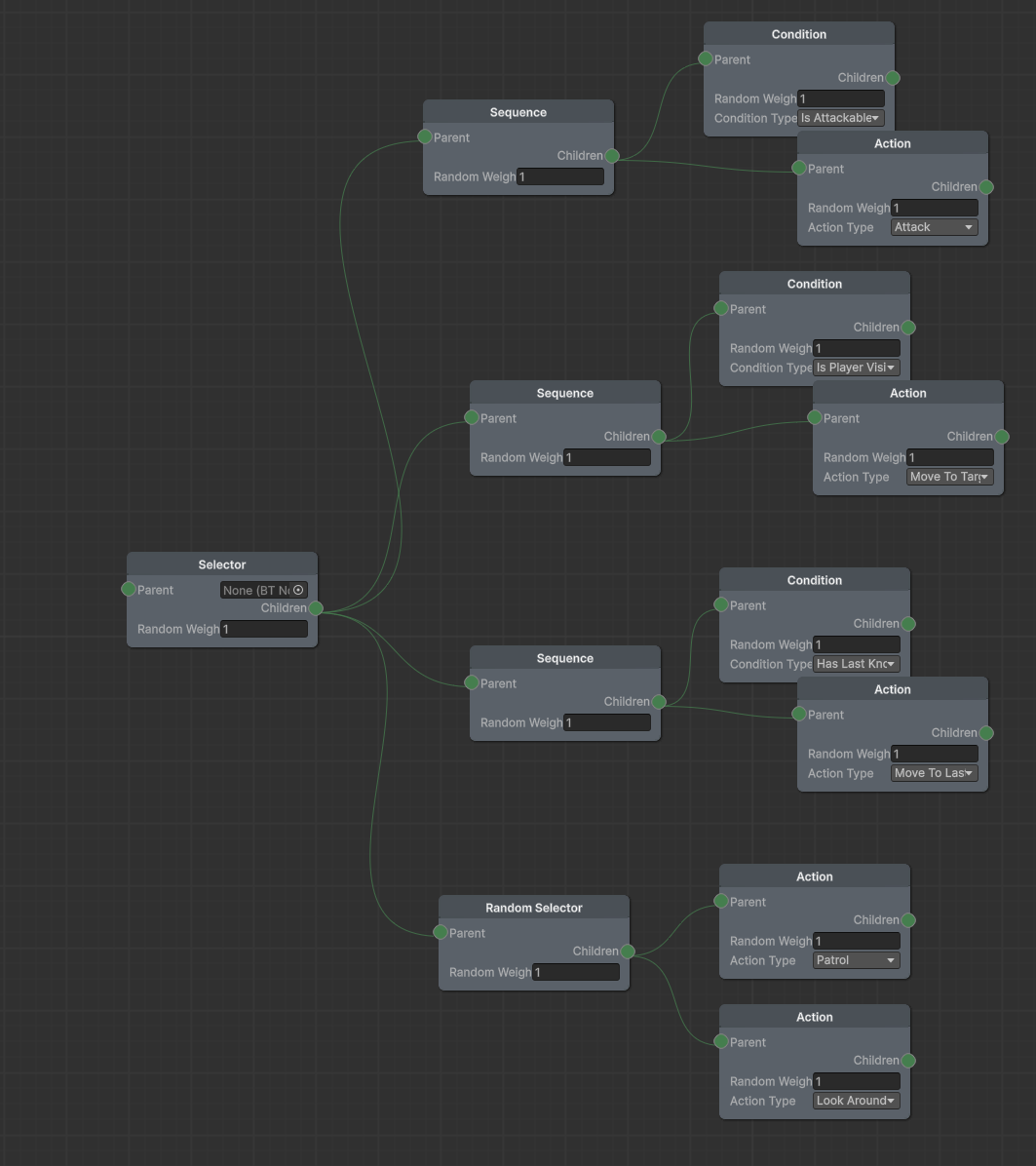
xNode 만들기
public abstract class BTNode : Node {
    [Input] public BTNode parent;
    [Output] public BTNode children;
    public float randomWeight = 1f;

    public virtual NodeType Type => NodeType.Action;

    public virtual int GetNodeData() => 0;
}
우선 기본이 될 Base 노드를 만들어준다.
public class SequenceNode : BTNode {
    public override NodeType Type => NodeType.Sequence;
}
이후 이런식으로 Sequence, Selector, Condition, Action 노드들을 구현해주자. 그냥 껍데기만 있으면 된다.
그리고 xNode 그래프를 만들면 끝. (그래프 만드는 법은 AI한테 물어보자)
실제 Node 정의하기
public struct AIBehaviorNode
{
    public NodeType Type;   // 노드 종류 (Selector, Sequence, Action...)
    public int DataID;          // ActionType이나 ConditionType의 Enum 값 (int로 저장)

    // 트리 탐색을 위한 인덱스들
    public int ChildrenStartIndex; // 첫 번째 자식이 배열 몇 번에 있는지 (-1이면 없음)
    public int ChildrenCount;      // 자식 개수
    public int NextSiblingIndex;   // 내 오른쪽 형제가 배열 몇 번에 있는지 (-1이면 없음)
    public float Weight;           // RandomSelector 등에서 사용할 가중치
}
실제 노드는 위와 같이 정의한다. Node는 트리구조이므로 인덱스 찾는 과정을 직접 해줘야한다. (Node 자체는 1차원 어레이에 다 저장됨)
나중에 시스템에서는
public struct AIBehaviorBlobAsset
{
    public BlobArray<AIBehaviorNode> Nodes;
}

public struct BehaviorTreeState : IComponentData
{
    public BlobAssetReference<AIBehaviorBlobAsset> BehaviorTree;
    public int CurrentNodeIndex;     // 현재 실행 중인 노드 인덱스
}
위와 같은 형식으로 접근할 것이다.
Bake하기

Enemy Prefab에 Authoring 하나 붙여주자. 그리고 사용할 Behavior Tree 그래프를 연결한다.
뒤 이어 말하겠지만 이것도 구현 방식이 입맛따라 다를 것이다. (중앙에서 관리하고 id로 BT를 얻어오는 방식도 있을 수 있다.)
using var blobBuilder = new BlobBuilder(Allocator.Temp);
ref var blobRoot = ref blobBuilder.ConstructRoot<AIBehaviorBlobAsset>();

var flatNodes = new List<AIBehaviorNode>();

var rootNode = authoring.graph.GetRoot();

if (rootNode != null)
    FlattenGraph(rootNode, flatNodes);

var nodeArray = blobBuilder.Allocate(ref blobRoot.Nodes, flatNodes.Count);
for (int i = 0; i < flatNodes.Count; i++)
    nodeArray[i] = flatNodes[i];

var blobRef = blobBuilder.CreateBlobAssetReference<AIBehaviorBlobAsset>(Allocator.Persistent);
AddBlobAsset(ref blobRef, out _);   //중복이면 유니티가 알아서 제거해줌.

AddComponent(entity, new BehaviorTreeState
{
    BehaviorTree = blobRef,
    CurrentNodeIndex = 0,
});

AddComponent(entity, new AIBrain());
대략 Bake는 위와 같이 해주면 된다.
FlattenGraph는 그냥 트리를 DFS로 순회하며 flatList에 실제로 ECS에서 사용할 AIBehaviorNode 컴포넌트를 넣어주면 된다.
데이터 관리의 효율성을 위해서 BlobAsset 을 사용한다.
이러면 엔티티마다 Behavior Tree에 대한 레퍼런스(8byte)를 갖게된다.
그러면 여러 적 유닛이 동일한 Behavior Tree를 사용하는 경우는 어떨까?
var blobRef = blobBuilder.CreateBlobAssetReference<AIBehaviorBlobAsset>(Allocator.Persistent);
AddBlobAsset(ref blobRef, out _);   //중복이면 유니티가 알아서 제거해줌.
위 예시 코드의 일부를 보면 AddBlobAsset을 해주고 있는데, 이러면 유니티가 blob 바이너리 데이터의 해쉬를 구해 중복을 방지해준다.
당연하게도 다른 Subscene에 있는 적 유닛이라면 중복으로 올라갈 수 있겠지만 이 편이 직관적이다.
Behavior Tree 실행하기
NodeState TickNode(ref BlobArray<AIBehaviorNode> nodes, int nodeIndex,
    ref Unity.Mathematics.Random random, ref AIContext context)
{
    ref var node = ref nodes[nodeIndex];
    var ret = NodeState.Failure;

    switch (node.Type)
    {
        case NodeType.Selector:
            ret = ProcessSelector(ref nodes, ref node, ref random, ref context);
            break;
        case NodeType.Sequence:
            ret = ProcessSequence(ref nodes, ref node, ref random, ref context);
            break;
        case NodeType.Condition:
            ret = ProcessCondition(node.DataID, ref context);
            break;
        case NodeType.Action:
            ret = ProcessAction(node.DataID, ref context, ref random, nodeIndex);
            break;
        case NodeType.RandomSelector:
            ret = ProcessRandomSelector(ref nodes, ref node, ref random, ref context, nodeIndex);
            break;
    }

    return ret;
}

NodeState ProcessSelector(ref BlobArray<AIBehaviorNode> nodes, ref AIBehaviorNode node,
    ref Random random, ref AIContext context)
{
    int childIndex = node.ChildrenStartIndex;

    for (int i = 0; i < node.ChildrenCount; i++)
    {
        NodeState result = TickNode(ref nodes, childIndex, ref random, ref context);

        if (result == NodeState.Running) return NodeState.Running;
        if (result == NodeState.Success) return NodeState.Success;

        childIndex = nodes[childIndex].NextSiblingIndex;
    }

    return NodeState.Failure;
}
System이나 Job 파놓고 매 프레임 돌려주면 된다.
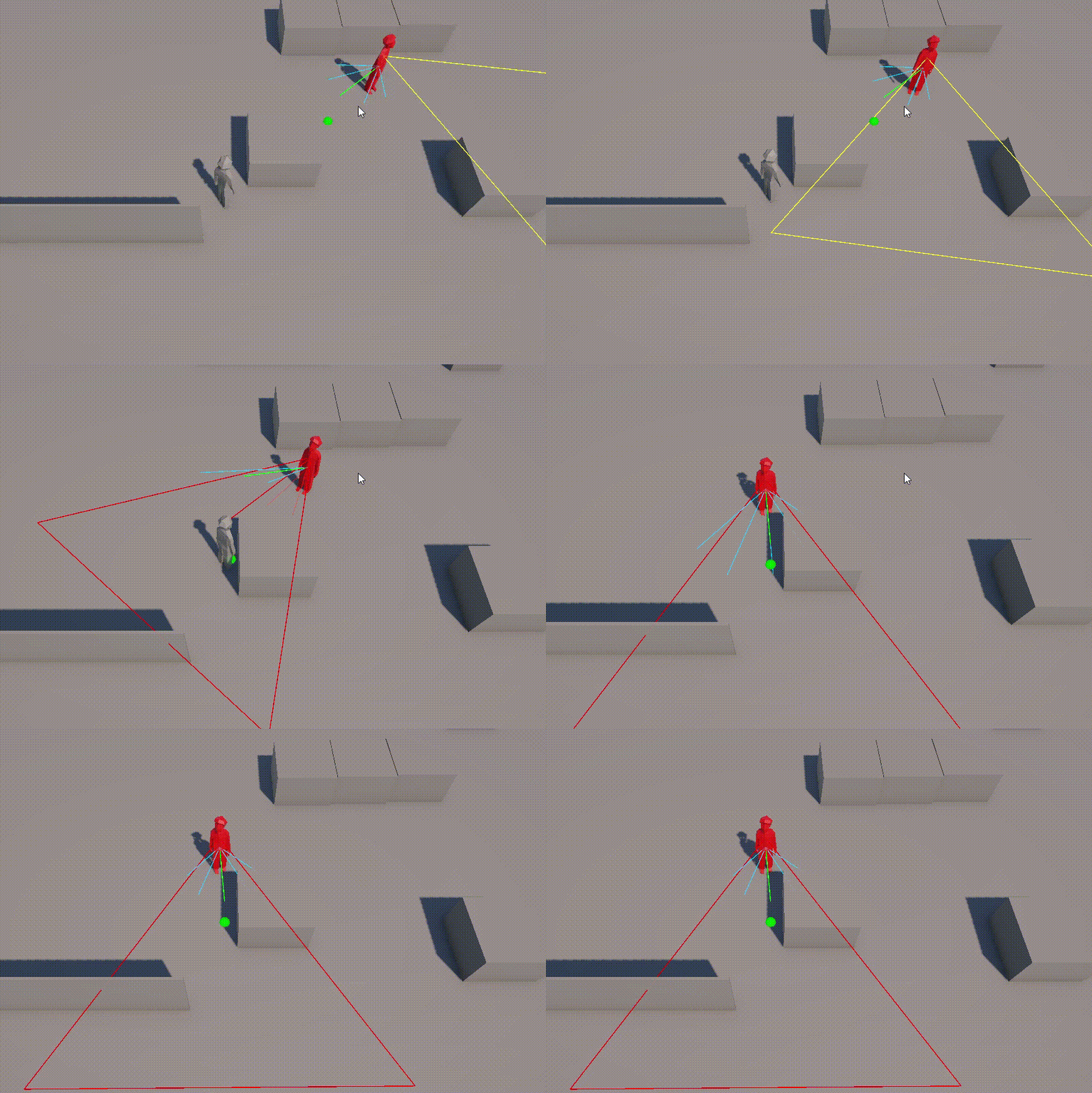
기본적으로 돌아다니다가 => 플레이어를 발견하면 공격 가능 거리로 가서 => 공격함. 이런 Behavior Tree가 잘 작동하는 것을 볼 수 있다.
'게임엔진 > ECS(Unity)' 카테고리의 다른 글
| BlobAsset의 개념 (0) | 2026.02.07 |
|---|---|
| ECB + sortKey (0) | 2025.11.30 |
| Entities - 컴포넌트 구조 (0) | 2023.02.25 |